

What is an email forwarder?
A forwarder works like mail redirection at the post office. If someone writes to info@yourdomain.com, the message also lands in another inbox, such as your personal one. You do not need to check two places.
Plesk is a control panel, a web page where you manage your hosting. The mail address must already exist in Plesk before you can forward it.
Steps
- Log in to Plesk.
- Click Mail in the left menu. You can also open it from Websites & Domains.
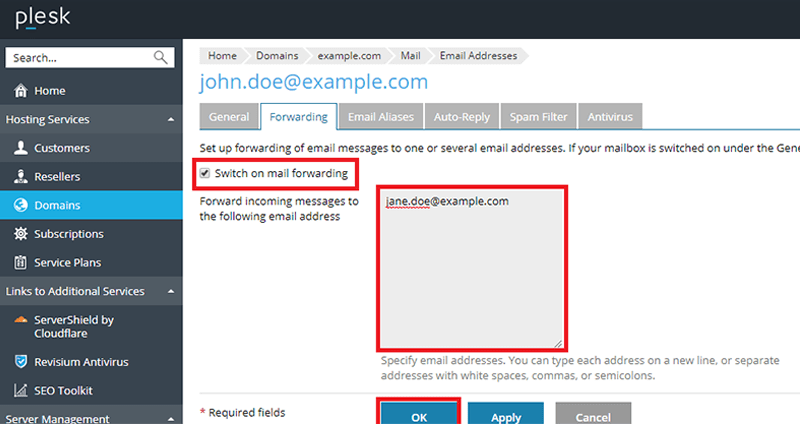
- Click the email address you want to forward.
- Open the Forwarding tab.
- Tick Enable mail forwarding.
- Type the target address in the box. This is where the copies will go.
- To forward to more than one address, put each on its own line.
- Click OK to save.
Test it
- Send a test message to the original address from another account.
- Look in the target inbox.
- Check the spam folder if the message does not show up.
Tip: Warning: do not forward address A to B and then B back to A. This makes a loop and the mail will bounce.
Good to know
- Plesk can keep a copy in the original mailbox too. Look for that setting on the same page. If it is off, the original mailbox stays empty.
- Some mail services mark forwarded mail as spam. If that happens, ask the target provider to trust your domain.
- To stop forwarding, untick Enable mail forwarding and click OK.
Need more help? Open a support ticket.
Quick recap
- A forwarder sends mail from one address to another.
- Go to Mail, pick the address, then Forwarding.
- Tick the box, type the target address and click OK.
- Test with a message.
- Avoid loops between two addresses.