

What is an auto-reply?
An auto-reply is a message that goes out by itself. It is like a "back in 5 minutes" sign on a shop door. When someone emails you, they get your note right away. People often use it for holidays or to say "we got your message".
Plesk is a control panel, a web page where you manage your hosting. The email address must already exist.
Steps
- Log in to Plesk.
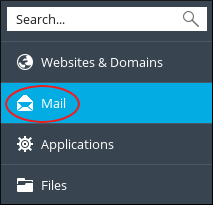
- Click Mail in the left menu.
- Click the email address you want to set up.
- Open the Automatic Reply tab.
- Tick Enable automatic reply.
- Type a short subject, such as "I am away".
- Write your message in the big box. Say when you will be back and who to contact if it is urgent.
- Choose how often to reply to the same sender. Replying once a day is a good limit. It stops endless message loops.
- Click OK.
Example message
"Hello, thanks for your email. I am out of the office until Monday. I will answer when I return."
Turn it off
- Go back to Mail.
- Open the same address and the Automatic Reply tab.
- Untick Enable automatic reply.
- Click OK.
Tip: Remember to switch it off when you are back. Otherwise people keep getting the old message.
Send yourself a test message from another account to check it works. If it does not, open a support ticket.
Quick recap
- An auto-reply answers email for you.
- Open Mail, pick the address, then Automatic Reply.
- Tick the box, write the subject and message, and click OK.
- Limit repeat replies to the same person.
- Turn it off when you return.