

What is a connection string?
A connection string is a line of text that holds the address and login for a database. It is like a note that says where the filing cabinet is and which key opens it. The file web.config is a settings file for ASP.NET sites on Windows hosting. It sits in the main folder of your site.
A database is a storage place for your site's data.
What you need
- The database server name. Often it is
localhost. Your welcome email or Hostvento support can tell you. - The database name.
- The database username and password. You can create these in Plesk under Databases.
Steps
- Back up your site. A typing mistake in
web.configcan stop the whole site. - Open the file with the Plesk File Manager or an FTP program. It is in the
httpdocsfolder.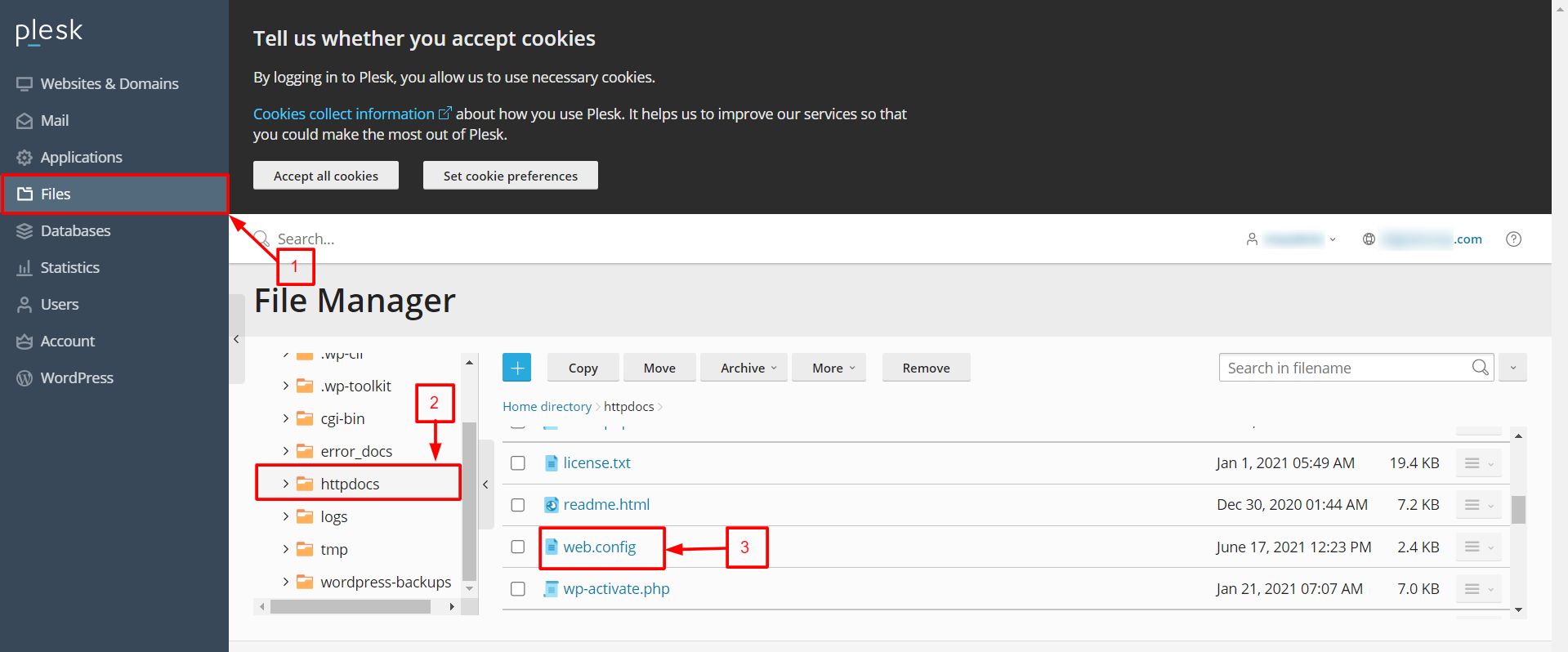
- Find the
<configuration>tag. - Add a
connectionStringsblock inside it. Use this example for SQL Server:
<connectionStrings>
  <add name="MyDb"
       connectionString="Data Source=localhost;Initial Catalog=mydatabase;User ID=myuser;Password=mypassword;"
       providerName="System.Data.SqlClient" />
</connectionStrings>
This creates a connection named MyDb. Replace the server, database, user and password with your own values.
- Save the file.
- Reload your site to check it works.
- In your code, read the string by its name,
MyDb.
Tip: Warning:
web.config holds a password. Never share it or upload it to a public place. If your password has symbols like &, write it as & in the file.If you see an error, check for typos and missing quotes. Open a support ticket if you need help.
Quick recap
- A connection string tells your site how to reach its database.
- It goes inside
<connectionStrings>inweb.config. - You need server, database, user and password.
- Back up before editing.
- Keep the file private.