

What is a restart?
Restarting a server is like turning a computer off and on again. It can fix a slow or stuck server. A VPS or dedicated server is a computer you rent for your own use. Plesk is a web page for managing it.
Warning: A restart shuts down every website and email service on the server for a few minutes. Do it when few visitors are online. Save any open work first.
Steps
- Log in to Plesk as the administrator.
- Click Tools & Settings in the left menu.
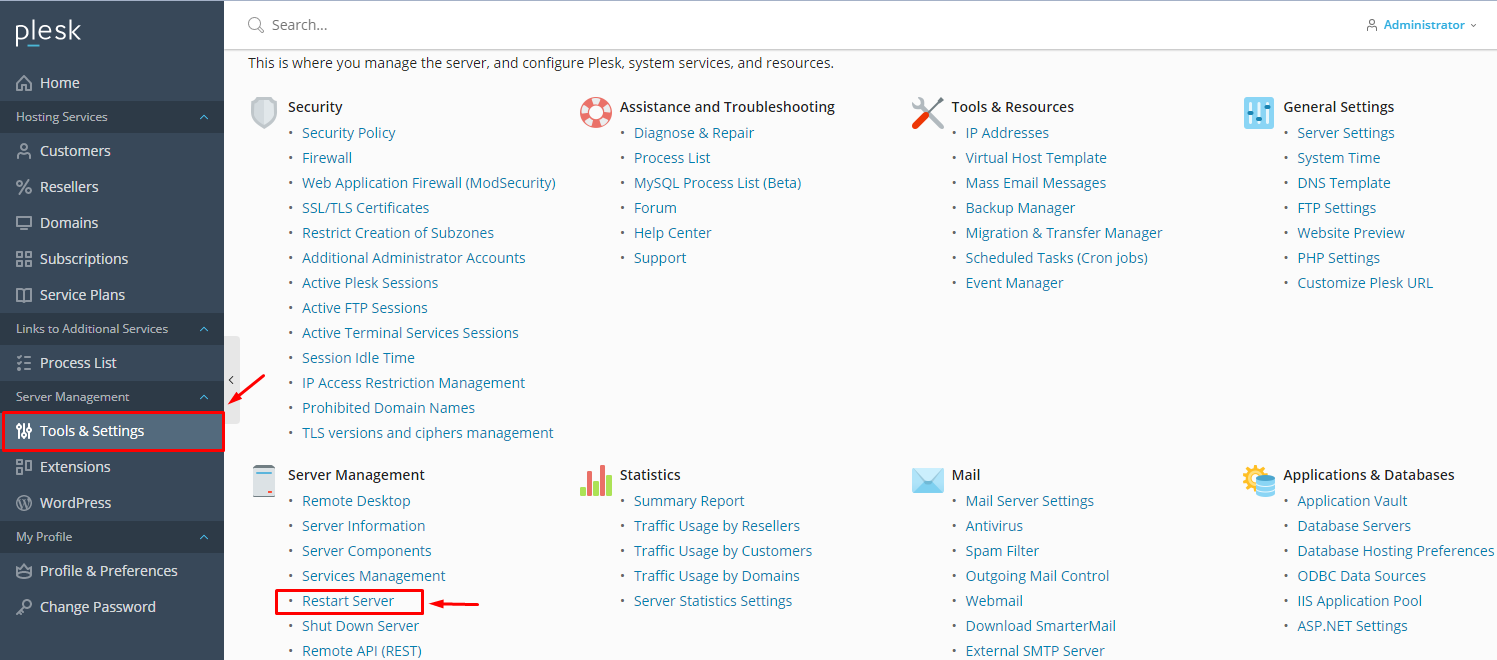
- Find the section General Settings and look for Server Management or Restart Server. The exact place can differ between Plesk versions.
- Click Restart Server.
- Plesk shows a message asking for confirmation. Tick the box if asked.
- Click OK.
- Wait a few minutes. The Plesk page will stop loading for a while.
- Refresh the login page. When it appears again, log in and check your websites.
Tip: If the restart option is missing, you may not have admin rights. Ask the person who manages the server, or open a support ticket.
Restart only one service instead
Sometimes you only need to restart one part, such as the web server. Go to Tools & Settings, then Services Management. Find the service and click the restart icon. This causes less downtime.
If the server does not come back
- Wait ten minutes. Big servers take longer.
- Check your client area for the server status.
- Open a ticket and tell support the time you restarted it.
Quick recap
- A restart is like turning the server off and on.
- It briefly takes all sites offline.
- Use Tools & Settings in Plesk, then restart the server.

- Restart a single service when that is enough.