

What is a suspension page?
When an account is suspended, its website stops working for visitors. Think of it as a "closed" sign on a shop. Visitors see a suspension page instead. The default page is plain. A custom page lets you show your brand and say what to do next, such as "Please contact the site owner" or "Please contact us about billing".
WHM is the control panel for resellers and server owners. A control panel is a web page where you manage hosting. Whether you can change this page depends on your plan. Ask Hostvento support if you do not see the options below.
Steps
- Write a simple HTML page. Keep it short. Do not use secret data in it. Here is a small example:
<html>
<head><title>Account Suspended</title></head>
<body>
<h1>This account is suspended</h1>
<p>Please contact your hosting provider.</p>
</body>
</html>
This is a plain web page that shows a title and one line of text.
- Log in to WHM.
- Search for "Web Template Editor" in the search box.
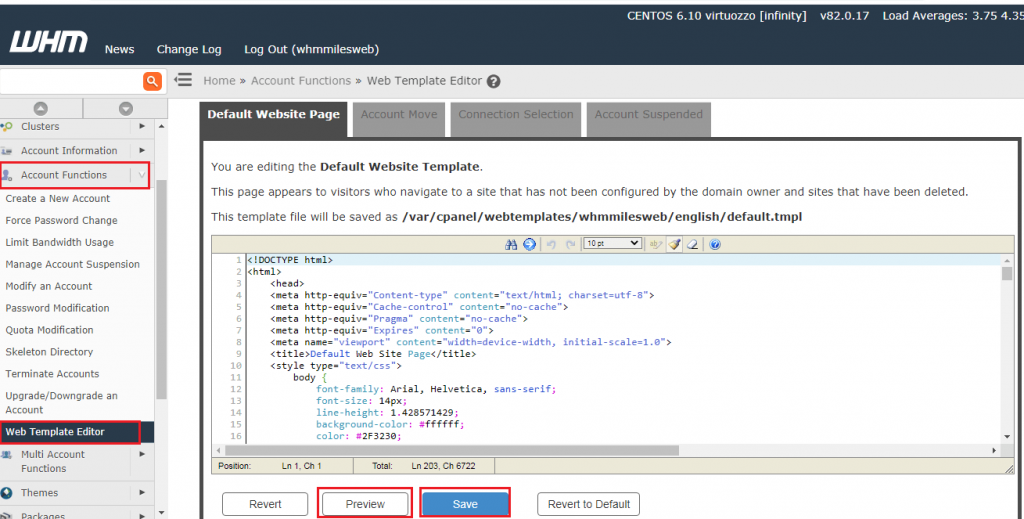
- Open Web Template Editor.

- Pick the template for the suspended page. It is often named Suspended Account.
- Paste your page into the editor.
- Click Save.
- Suspend a test account and open its website to see the result.
- Unsuspend the test account when you are done.
Tip: Warning: only suspend accounts you own and can safely restore. Suspending a live customer's site stops it for visitors. Take a backup of your old template text before you change it.
Some servers use a file called suspendedpage.html instead. If you cannot find the editor, open a support ticket.
Quick recap
- A suspension page is what visitors see on a suspended account.
- Write a short HTML message with your own text.
- Use Web Template Editor in WHM.
- Test with a spare account and unsuspend it afterward.
- Ask support if the option is missing.