

What is the Cloudflare cache?
Cloudflare is a service that sits between your visitors and your website. It keeps saved copies of your pages and images. This saved copy is called a cache. Think of a shop that keeps popular items near the door. Visitors get things faster that way.
Sometimes the saved copy is old. You change your site, but visitors still see the old version. Clearing the cache, also called purging, fixes that.
Steps to clear everything
- Go to the Cloudflare website and log in.
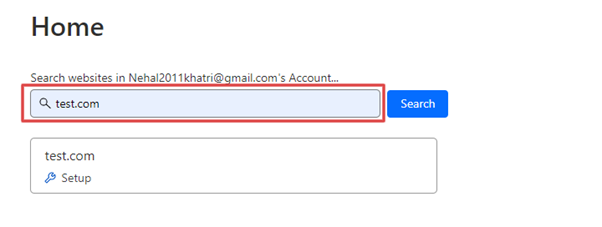
- On the home screen, click your domain name.
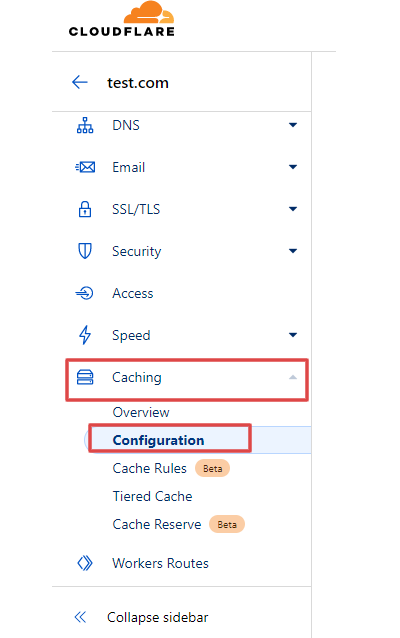
- In the left menu, open Caching.
- Click Configuration.
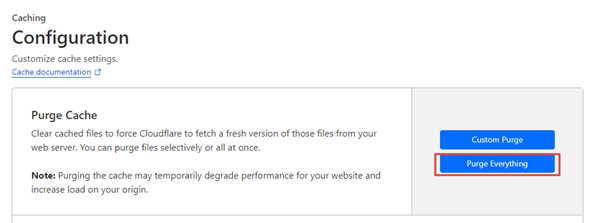
- Find the Purge Cache area.
- Click Purge Everything.
- Read the message and click Purge Everything again to confirm.
Your site may be a little slower for a short time. Cloudflare must save fresh copies again.
Steps to clear one page
- Open Caching and then Configuration.
- Click Custom Purge.
- Choose the option to purge by URL. A URL is a full web address.
- Type the full address of the page, for example
https://example.com/page. Use your own domain. - Click Purge.
Tip: Use a single page purge when you only changed one page. It keeps the rest of your site fast.
Still seeing the old page?
- Clear your browser cache too. Your browser keeps its own saved copy.
- Try a private or incognito window.
- Clear any cache plugin on your site, such as one in WordPress.
- Wait a minute or two and reload.
The menu names in Cloudflare can change over time. If you do not see these names, look for a section about caching or purging.
If you still have trouble, open a support ticket at https://secure.hostvento.com/submitticket.php.
Quick recap
- The cache is a saved copy of your site kept by Cloudflare.
- Purging removes the old copy.
- Use Purge Everything for the whole site.
- Use Custom Purge for one page.
- Also clear your browser and site cache plugins.