

What is a wildcard certificate?
An SSL certificate locks the connection between a visitor and your site. A normal one covers one name only. A wildcard certificate covers many names at once. It is written with a star, like *.example.com.
A subdomain is a front part added to your domain, such as blog.example.com or shop.example.com. The star stands for any one of them.
Why is it useful?
- You buy and manage one certificate, not many.
- New subdomains are covered at once.
- It can save time and money if you have many subdomains.
One limit: it covers one level only. *.example.com covers blog.example.com but not a.blog.example.com.
What you need first
- A domain name that you own.
- Access to the domain's email or DNS settings. DNS is the phone book of the internet. It turns a name into a number.
- A CSR. This is a Certificate Signing Request, a block of text that you create on your server and send to the certificate seller.
- A wildcard certificate order from a seller. Ask Hostvento support whether they offer one.
Steps to get one
- Log in to cPanel and open SSL/TLS.
- Click Certificate Signing Requests (CSR).
- In the Domains box, type
*.example.com. Use your own domain. - Fill in the other boxes, such as country and email.
- Click Generate. Copy the CSR text.
- Order the wildcard certificate from your seller and paste the CSR when asked.
- Prove you own the domain. The seller will ask you to use email, a DNS record, or a file. Wildcard certificates usually need the DNS or email method.
- Wait for the seller to issue the certificate. Download it.
- In cPanel, go to SSL/TLS, then Manage SSL sites, and install the certificate.
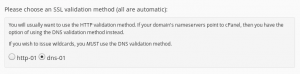
Tip: Free wildcard certificates exist from some providers, but they need DNS proof. Ask support if your plan allows this.
Quick recap
- A wildcard certificate covers a domain and all its first-level subdomains.
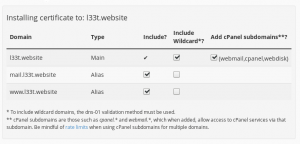
- It is written as
*.example.com. - Create a CSR with the star name, order, prove ownership, then install.
- It does not cover deeper levels.