

What is it?
SSL is a lock for the link between a visitor and your website. Let's Encrypt is a free, trusted company that issues SSL certificates. A certificate is a digital ID card for your site. After it is active, your address starts with https:// and shows a padlock.
Which tool your plan uses can differ. Ask Hostvento support if your plan has Let's Encrypt, AutoSSL or both.
Steps in cPanel
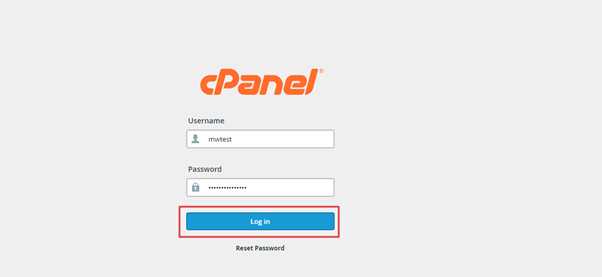
- Log in to cPanel from your client area or welcome email link.
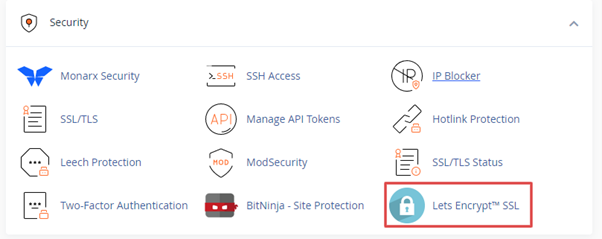
- Look in the Security section. If you see Let's Encrypt SSL, open it. If not, open SSL/TLS Status.
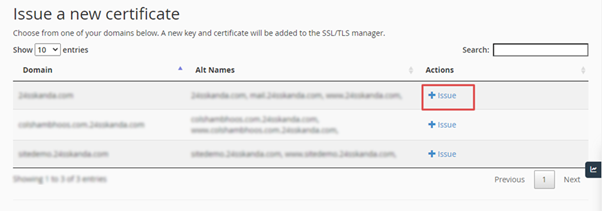
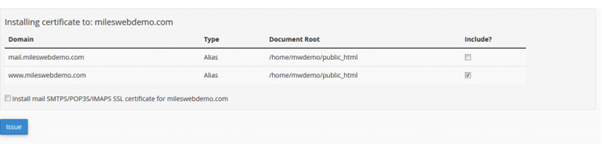
- If you see Let's Encrypt SSL, click Issue beside your domain. Check that the box for the
wwwname is ticked as well. Click Issue again. - If you see SSL/TLS Status, tick your domain and click Run AutoSSL.
- Wait a few minutes.
- Refresh the page. Your domain should now show a valid certificate.
Make visitors use https
A certificate alone does not force the secure version. Do one of these:
- In cPanel, open Domains and switch on Force HTTPS Redirect for your domain, if you see it.
- Or add a redirect rule in
.htaccess. Back the file up first. - In WordPress, open Settings then General. Change both addresses to start with
https://.
Test it
- Open a private browser window.
- Go to
http://yourdomain.com. It should change to https. - Check the padlock.
If it fails
- The domain must point to this hosting. Check your DNS settings. DNS is the internet's phone book.
- A redirect or firewall may block the check. Pause it and try again.
- Too many requests in a short time can pause issuing. Wait and try later.
Tip: Let's Encrypt certificates last 90 days. They renew by themselves with cPanel tools. Stuck? Open a ticket.
Quick recap
- Use Let's Encrypt SSL or SSL/TLS Status in cPanel.
- Click Issue or Run AutoSSL.
- Then force https with a redirect.
- Test in a private window.