

What is a private key?
An SSL certificate needs two matching parts. The public part is the certificate. The secret part is the private key. Think of a padlock and its only key. Everyone can see the padlock. Only you hold the key. Keep it safe and never send it to anyone.
Webuzo is a control panel, a web page where you manage your hosting. Ask Hostvento support whether Webuzo is available on your plan.
Steps
- Log in to Webuzo. Your welcome email has the address and login details.
- Find the Security section. Click SSL.
- Open the Private Keys tab.

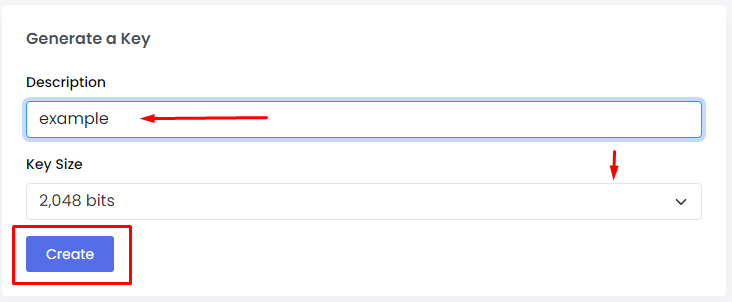
- Fill in the form to create a key. You may see a field for the domain or a key name. Type a name you will remember.
- Choose the key size. 2048 bits is the usual choice. A bigger number means a stronger key.
- Click the button to create the key, such as Create or Generate.
- The new key appears in the list. Click it to view the text.
- Copy the key text. Save it in a safe place on your computer.
Menu names can differ a little between Webuzo versions. If a label looks different, look for the closest match.
What next?
- Use the key to make a CSR. A CSR is a Certificate Signing Request. It is a block of text you send to the certificate seller.
- Order the certificate and install it when it arrives.
Tip: Keep the key file and the certificate together in one folder. If you lose the key, you must start again and get a new certificate.
Warning: never paste your private key into emails, chats or public forms.
Quick recap
- The private key is the secret half of an SSL pair.
- In Webuzo, go to SSL and open the Private Keys tab.
- Pick 2048 bits and create the key.
- Copy it and store it safely.
- Next, create a CSR. Contact support for help if needed.