

What are these things?
Apache is a program that shows your website to visitors. An SSL certificate is a digital badge that makes the connection safe, so the address starts with HTTPS. Let's Encrypt is a free service that gives out these certificates. Certbot is a helper tool that gets and installs them for you.
Before you start
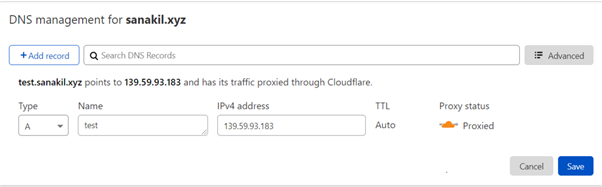
- Your domain name must point to your server's IP address. Without this, Let's Encrypt cannot check that you own the domain.
- Ports 80 and 443 must be open in your firewall.
Steps
- Log in to your server with SSH.
- Update the package list:
This refreshes the list of software you can install.sudo apt update - Install Apache:
sudo apt install apache2 -y - Check that Apache is running:
You should see the word "active".sudo systemctl status apache2 - Open your server IP in a browser. You should see the Apache welcome page.
- Create a virtual host file. A virtual host tells Apache which folder belongs to which domain:
sudo nano /etc/apache2/sites-available/yourdomain.com.conf - Paste this and change the names to yours:
<VirtualHost *:80> ServerName yourdomain.com ServerAlias www.yourdomain.com DocumentRoot /var/www/yourdomain.com </VirtualHost> - Create the folder and turn the site on:
sudo mkdir -p /var/www/yourdomain.com sudo a2ensite yourdomain.com.conf sudo systemctl reload apache2 - Install Certbot:
sudo apt install certbot python3-certbot-apache -y - Run Certbot:
Type your email address and agree to the terms when asked. Choose to redirect HTTP to HTTPS if offered.sudo certbot --apache -d yourdomain.com -d www.yourdomain.com - Visit
https://yourdomain.comand look for the padlock. - Test automatic renewal:
Let's Encrypt certificates last a short time, so renewal must work.sudo certbot renew --dry-run
Tip: These commands are for Ubuntu and similar systems. Other systems use different commands but the idea is the same.
Quick recap
- Install Apache, then create a virtual host for your domain.
- Point your domain to the server first.
- Install Certbot and run it with the
--apacheoption. - Test renewal with
certbot renew --dry-run.