

What is an SSL certificate?
An SSL certificate is like an ID card for your website. It proves your site is the real one. It also scrambles the data that travels between your visitor and your site, so nobody can read it on the way. A site with a certificate loads over HTTPS and shows a padlock in the browser.
Types of certificates
- Free certificates. Services such as Let's Encrypt give these out at no cost. They are good for blogs and small sites.
- Paid certificates. A certificate company sells these. They often include extra checks of your business and a warranty.
Ask Hostvento support which choices are on your plan.
Option 1: Use a free certificate from your control panel
- Log in to your hosting control panel. Look in your welcome email or the client area for how to open it.
- Look for a tool named SSL/TLS Status or AutoSSL, or a similar item.
- Select your domain and start the check or the install.
- Wait a few minutes while the certificate is issued.
- Open
https://yourdomain.comto test.
Option 2: Buy a certificate from a company
- Create a CSR. A CSR (Certificate Signing Request) is a block of text with details about your site. Your control panel usually has a tool to make it. It also makes a private key. Keep the private key secret.
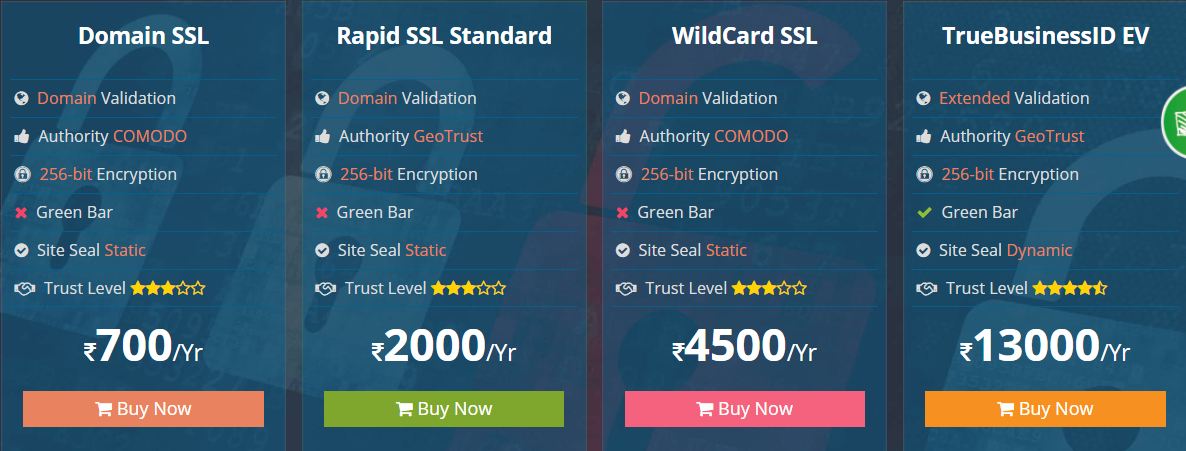
- Choose a certificate and place an order.
- Paste your CSR into the order form when asked.
- Pick a way to prove you own the domain. This is usually an email, a DNS record or a small file you upload to your site.
- Finish the check. The company then sends you the certificate files.
- Install the files on your hosting. Look for an Install an SSL Certificate tool in your control panel, and paste in the certificate and key.
After you install
- Visit your site with
https://and check for the padlock. - Set up a redirect so visitors who type
http://go to the safe version. - Fix any items that still load over plain HTTP.
Tip: Certificates run out after a set time. Free ones usually renew on their own. Paid ones need you to renew them. Set a reminder in your calendar.
Quick recap
- An SSL certificate makes your site safe and adds a padlock.
- You can use a free certificate or buy one.
- A paid one needs a CSR and a domain check.
- Install it, test HTTPS and redirect old HTTP links.