

What it means
The browser shows Not secure or a warning triangle when the connection to a site is not fully protected.
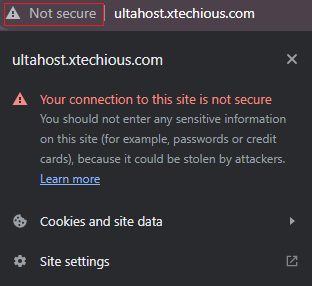
Typical causes:
- No SSL/TLS certificate. This is the most common cause. The site runs on plain HTTP.
- Expired certificate. The certificate passed its end date.
- Invalid certificate. It is for another domain, not trusted or set up in a wrong way.
- Mixed content. The page loads over HTTPS, but some files (images, scripts, styles) load over HTTP.
Fix it as a website owner
- Install an SSL/TLS certificate. You can get one from your host or from a certificate authority. Many hosts offer a free one with Let's Encrypt.
- Renew the certificate before it expires. Turn on auto-renewal.
- Fix certificate errors. Make sure the certificate covers the domain and the
wwwversion, and that the full chain is installed. - Serve all content over HTTPS. Change
http://links tohttps://in your pages, themes and database. In WordPress, a plugin such as Really Simple SSL, or a search-and-replace tool, helps. - Redirect HTTP to HTTPS. For Apache, add this to
.htaccess:
RewriteEngine On
RewriteCond %{HTTPS} off
RewriteRule ^(.*)$ https://%{HTTP_HOST}%{REQUEST_URI} [L,R=301]
What visitors can do
- If you do not trust the site, do not enter any private data.
- Type
https://at the start of the address by hand. - Tell the site owner about the warning.
- Use an up-to-date browser with good security.
- Install a security extension that warns about unsafe sites.
- Check your computer's date and time. A wrong clock can cause SSL warnings.
Why HTTPS matters
- Security. It encrypts data between the visitor and the site.
- SEO. Search engines prefer HTTPS sites.
- Trust. Visitors feel safer when they see the padlock.
Quick recap
- A missing, expired or invalid certificate, or mixed content, causes the warning.
- Owners: install and renew SSL, use HTTPS everywhere and redirect.
- Visitors: avoid entering private data on such pages.