

What is a private key?
When you get an SSL certificate, you work with two secret-and-public pieces. The private key is a secret file that stays on your server. It is made when you create a CSR, which is a request form for a certificate. The certificate is the public half that proves your site is real. Both must match. Never share the private key with anyone.
Webuzo is a control panel, a web page for managing hosting. Menu names can differ between versions, so use the search box in Webuzo if you do not see an item. Ask Hostvento support whether Webuzo is on your plan.
Before you start
- Have the private key text ready. It starts with
-----BEGIN PRIVATE KEY-----or-----BEGIN RSA PRIVATE KEY-----. - Have the certificate text (CRT) from your SSL company. It starts with
-----BEGIN CERTIFICATE-----. - If you got a CA bundle, keep it ready too. It is the file that links your certificate to a trusted root.
Steps
- Log in to Webuzo.

- Click SSL, or search for "SSL" in the panel.
- Open the page for adding a certificate. It may be named SSL Certificates or Install SSL.
- Choose your domain from the list.
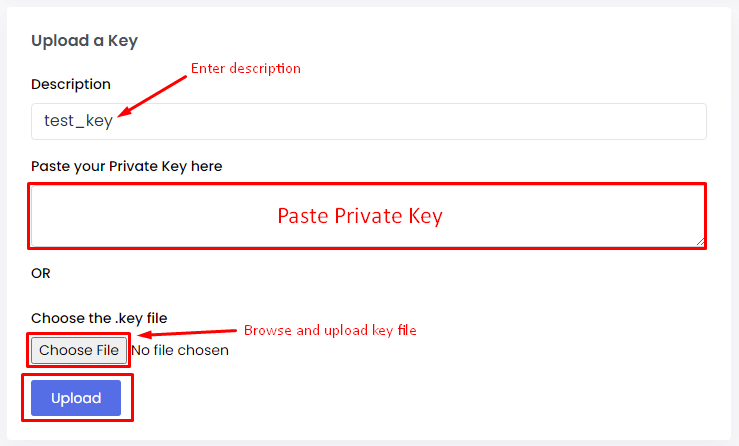
- Open the file or text file of your private key in a plain text editor such as Notepad. Select all, then copy.
- Paste it into the box named Private Key (or KEY). Include the BEGIN and END lines.
- Paste your certificate into the Certificate box.
- Paste the CA bundle into the CA Bundle box, if there is one.
- Click Submit or Install.
- Visit your site with
https://and check for the padlock.
Warning: If the key does not match the certificate, the install will fail. Make sure you use the key made with the same CSR.
Tip: Keep a safe copy of your private key on your computer. If you lose it, you must reissue the certificate.
Quick recap
- The private key is the secret half of your SSL setup.
- Open the SSL page in Webuzo and pick the domain.
- Paste the key, the certificate and the CA bundle.
- Click install and check the padlock.