

What is Webuzo?
Webuzo is a control panel. A control panel is a website where you manage your hosting. It is like the dashboard of a car. You can manage files, install apps, set up email and change PHP settings. Ask Hostvento support if your plan uses Webuzo.
Webuzo has two sides. The user panel is for one website account. The admin panel is for the whole server. VPS and dedicated customers may have both. Shared customers only have the user panel.
What you need
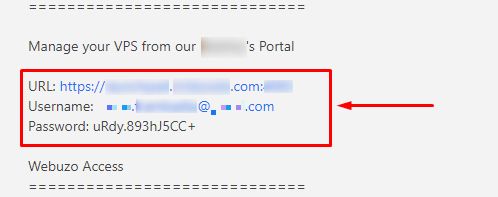
- The Webuzo address (URL). It is in your welcome email.
- Your user name and password. They are in the same email.
If you cannot find them, log in to the client area. Open Services, choose your hosting and look at the details. You can also open a support ticket.
Steps
- Open a web browser such as Chrome or Firefox.
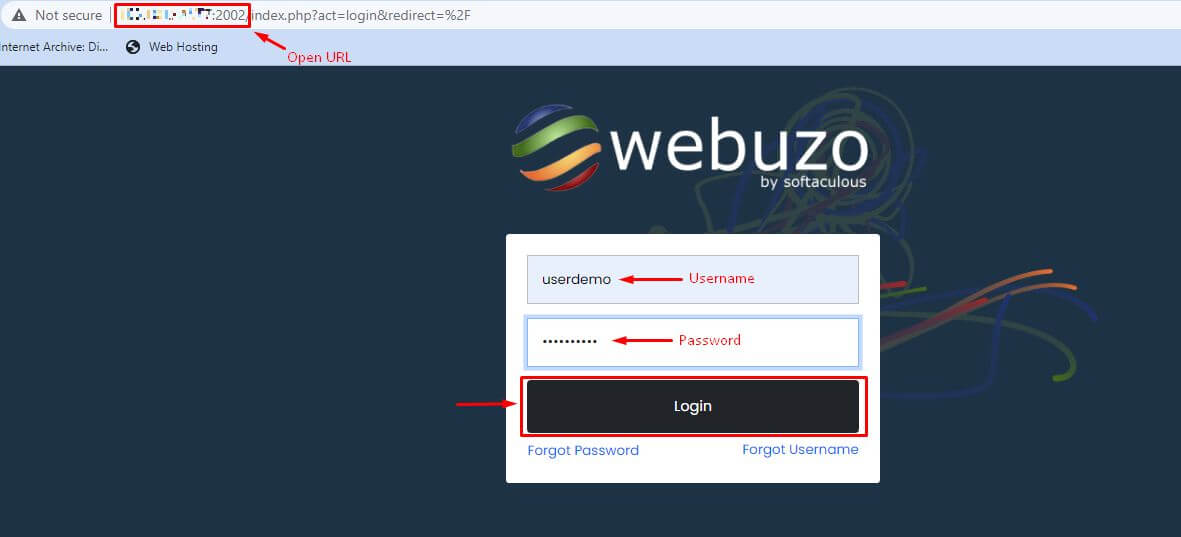
- Type the Webuzo address into the address bar. It often includes your server name or IP address and a port number. A port number is a door number on the server. It comes after a colon, for example
:2002. Use exactly what your welcome email says. - Press Enter.
- Your browser may warn that the connection is not private. This can happen with a new server that has no trusted certificate. If the address came from Hostvento, you can choose to go on.
- Type your Username.
- Type your Password.
- Click Login.
- You now see the Webuzo dashboard.
Finding your way around
The menu is on the left or the top. Look for groups like Files, Domains, Email and Software. A search box helps you find a tool by name.
Trouble logging in
- Check that Caps Lock is off. Passwords are case sensitive.
- Check that you used the user panel address and not the admin address.
- Copy and paste the password to avoid typing mistakes.
- If it still fails, ask support for a password reset.
Tip: Save the panel address in your browser bookmarks. Then you can reach it fast.
Quick recap
- Webuzo is a control panel for your hosting.
- Find the address, user name and password in your welcome email.
- Open the address, type the login and click Login.
- Ask support if you are locked out.