

Note: This is a server-wide change in the Webuzo admin panel. It needs root access, so it is for VPS and dedicated customers.
What is FastCGI?
Apache is a web server. It sends web pages to visitors. When a page is written in PHP, Apache must hand it to PHP to build it. There are different ways to do that hand-off. FastCGI is one of them.
Think of a kitchen. With a slow method, the cook starts from nothing for every order. With FastCGI, a few cooks stay ready and take orders one after another. This is usually faster and uses less memory when many people visit.
Why switch it on or off?
- On: faster pages and a lower load on busy sites.
- Off: useful if an old app does not work with it, or when you test a problem.
Warning: This restarts Apache. Sites are unreachable for a few seconds. Some apps can act differently after the change. Take a backup first and do it at a quiet time.
Steps
- Log in to the Webuzo admin panel. The address and root login are in your welcome email.
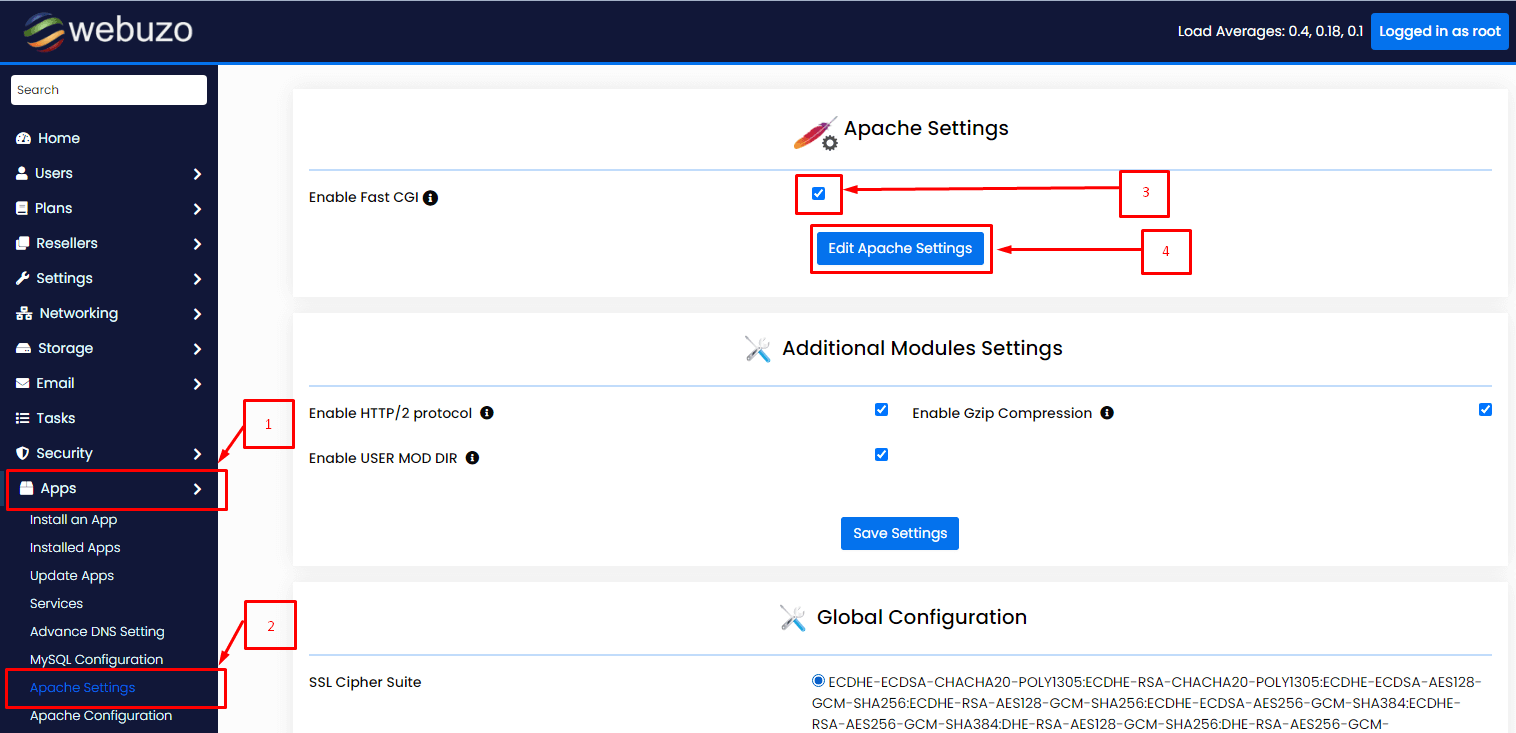
- Type Apache or FastCGI in the search box.
- Open the Apache settings page. The wording differs by Webuzo version, so use the search results as a guide.
- Find the FastCGI option.
- To turn it on, switch the toggle to Enable or tick the box.
- To turn it off, switch it to Disable or clear the box.
- Click Save or Submit.
- Wait while Webuzo rebuilds the configuration and restarts Apache.
Check it worked
- Open two or three of your sites. Click through some pages.
- Log in to the admin area of any app, such as WordPress.
- Look for blank pages or error messages.
If something breaks
- Go back to the same page.
- Set the option to what it was before.
- Save and wait for Apache to restart.
- If the sites do not come back, open a support ticket.
Tip: After enabling FastCGI, your PHP settings may be set per site. Check your PHP INI settings if limits seem different.
Quick recap
- FastCGI is a faster way for Apache to run PHP.
- Toggle it in the Apache settings in Webuzo admin.
- Apache restarts, so back up and pick a quiet time.
- Test your sites and undo if needed.