

What is ModSecurity?
ModSecurity is a web firewall. A firewall is like a guard at a door. It checks each request that comes to your site. If a request looks like an attack, it blocks it. It stops things such as SQL injection, where a hacker types tricky text into a form to steal data.
The guard follows a rulebook. Sometimes it blocks a real action by mistake. This is called a false alarm. You may see a "403 Forbidden" error when you save a post or upload a file.
When to turn it off
- Your site shows 403 errors for normal actions.
- You are testing to find the cause of a problem.
Steps
- Log in to Webuzo. The address and login are in your welcome email.
- Type ModSecurity in the search box.

- Open the ModSecurity tool. If it does not appear, ask Hostvento support whether it is on your plan. Server-wide setup needs the admin panel.
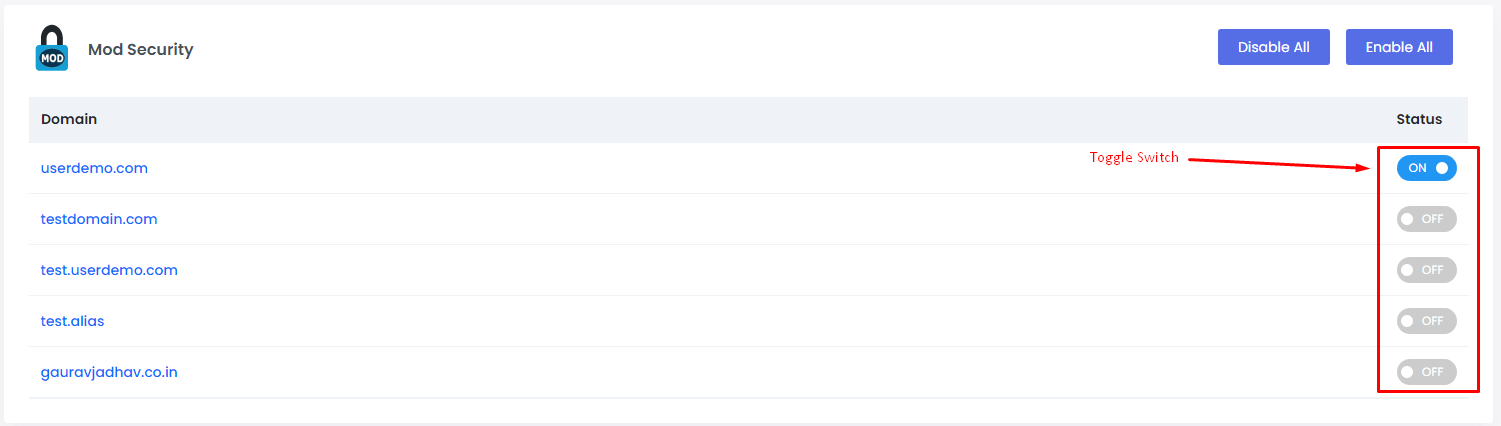
- You see a list of your domains with a switch next to each.
- Find the domain you want.
- To turn it off, set the switch to Off or click Disable.
- To turn it on, set the switch to On or click Enable.
- Confirm if a box asks you to.
- Wait a moment for the web server to reload.
- Repeat the action that failed before. Check whether the error is gone.
Install ModSecurity (admin)
On a VPS or dedicated server with root access, the admin panel may let you install ModSecurity from its software list. Search for it and install it. Then add a rule set, which is the rulebook, if the tool asks.
Find out what was blocked
The web server error log shows the rule that fired. Send that line to Hostvento support in a support ticket. They can help you add an exception for just that rule.
Quick recap
- ModSecurity is a web firewall that blocks attacks.
- It can block real actions by mistake.
- Use the ModSecurity tool in Webuzo to switch it per domain.
- Turn it off only briefly, then turn it on again.