

What is PEAR?
PHP is a language used to build websites. PEAR is a library of ready-made PHP code. A package is one add-on from that library. For example, one package may help send email. Developers install packages so they do not have to write the code themselves.
Webuzo is a control panel with a page to manage these packages. A control panel is a dashboard for your server. Ask Hostvento support if Webuzo is on your plan.
Why remove a package?
- You no longer use it.
- It is old and may have security holes.
- You want a clean server.
Warning: if a website still uses the package, removing it can break that site. Take a backup first. Ask your developer if you are not sure.
Steps
- Log in to the Webuzo panel.
- Look for PHP PEAR Packages. It may be under a PHP or Apps section. Use the search box if needed.

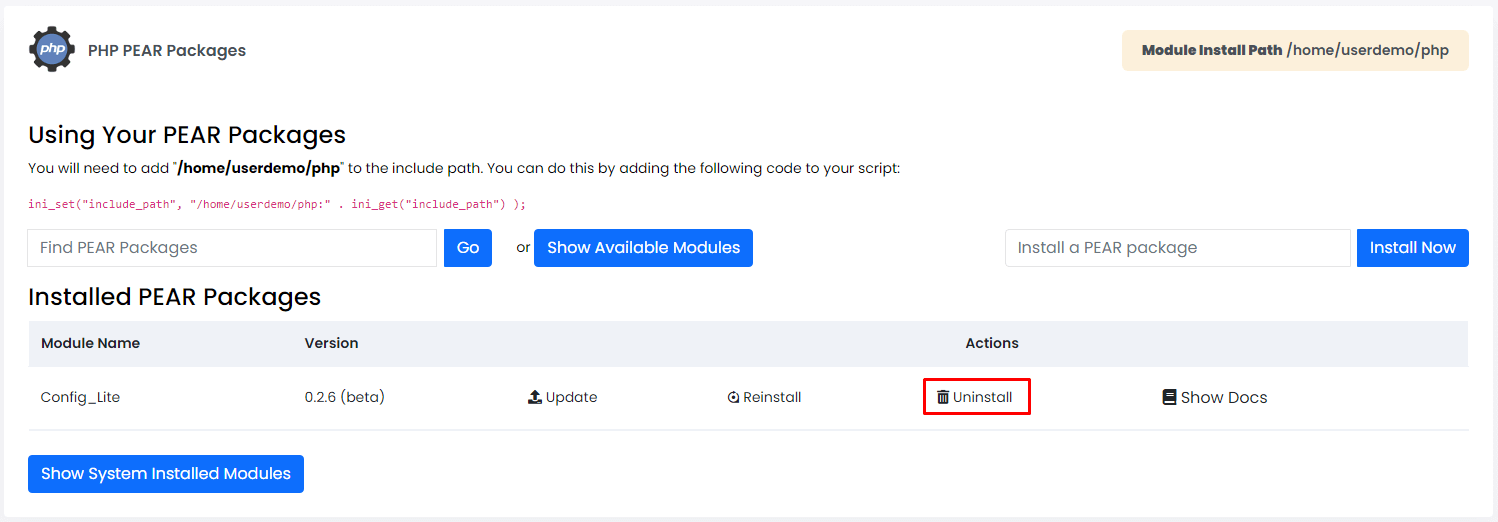
- Open it. You will see a list of installed packages.
- Find the package you want to remove.
- Click the Uninstall or Remove icon next to it.
- Confirm when Webuzo asks.
- Wait for a success message.
- Reload the package list to make sure it is gone.
- Open your websites and check that they work.
Using the command line
You can also use SSH. SSH is a safe way to type commands on your server. It needs root access.
pear uninstall Package_NameThis removes the named package. Replace Package_Name with the real name. To see what is installed, run the next command.
pear listThis shows all installed packages.
Quick recap
- PEAR holds reusable PHP code packages.
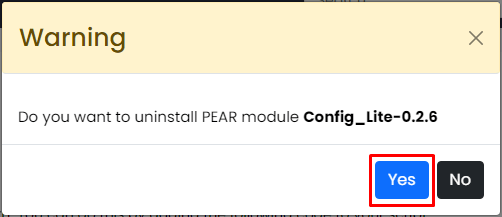
- Remove them from the Webuzo PEAR page.
- Back up first, since sites may need a package.
- Check your sites after removing.