

What are PEAR packages?
PHP is a language that runs many websites. PEAR is a library of ready-made PHP code. Each add-on in it is called a package. Packages get updates to fix bugs and close security holes. Like phone apps, they work better when updated.
Webuzo is a control panel, a dashboard for your server. Ask Hostvento support if it is on your plan.
Before you update
An update may change how a package works. A site that depends on the old way might break. Take a backup of your sites first. If you can, test on a copy of the site.
Steps
- Log in to the Webuzo panel.
- Find PHP PEAR Packages. Use the search box if you cannot spot it.

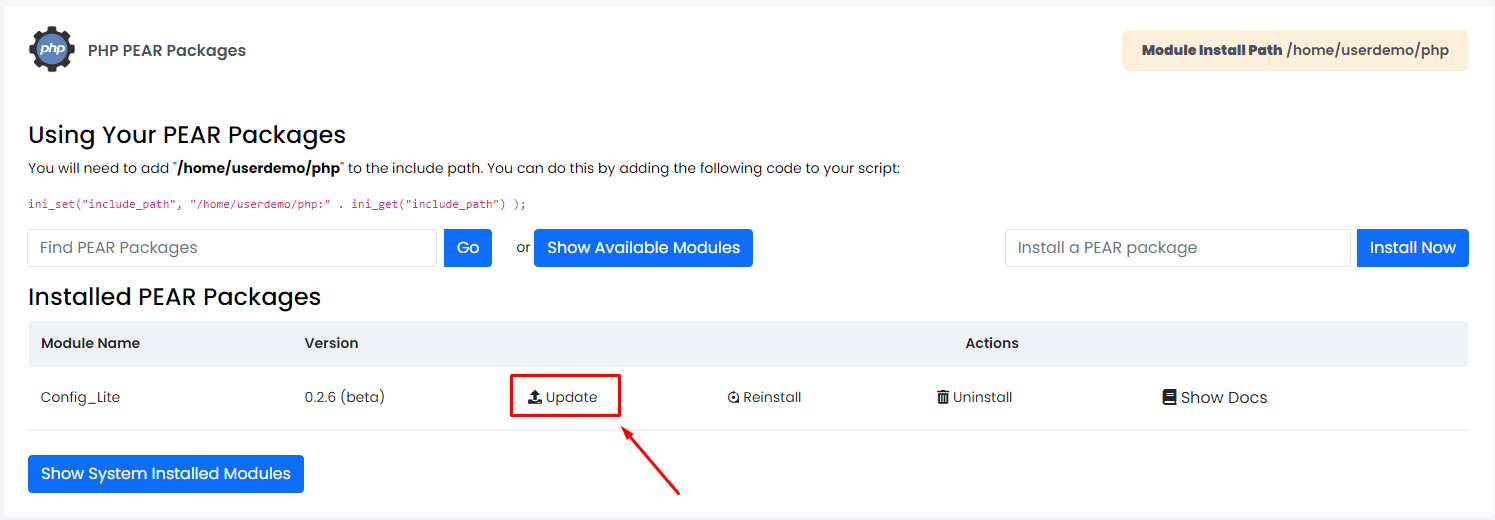
- Open the page and look at the list of installed packages.
- Look for an update button or a note that a newer version exists.
- Click Update beside the package you want to update.
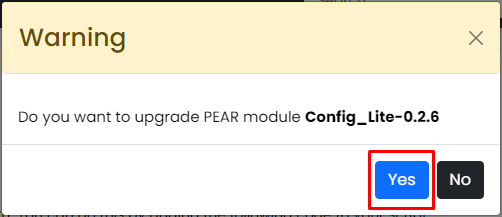
- Confirm the action if you are asked.
- Wait for the success message.
- Check the version number in the list. It should be higher now.
- Open your websites to make sure all pages still work.
Using the command line
With SSH and root access you can use commands. SSH is a safe way to type commands on a server.
pear list-upgradesThis shows packages that have newer versions.
pear upgrade Package_NameThis updates one package. Replace Package_Name with the real name.
pear upgrade-allThis updates every package at once. Use it with care.
Quick recap
- PEAR packages need updates for safety and fixes.
- Use the PEAR page in Webuzo and click Update.
- Back up your sites first.
- Test your sites after the update.