

What is this setting?
WHM is the control panel server owners use. The "Max emails per hour" setting is a cap on mail. After a domain sends that many emails in an hour, the server stops sending more until the next hour. It is like a tap that only lets a certain amount of water through.
It protects your server from spam. If a website is hacked and starts sending junk mail, the damage stops quickly.
You need WHM access. VPS, dedicated and reseller owners have it.
Steps to set it for the server
- Log in to WHM.
- Type Tweak Settings in the search box.
- Open Tweak Settings.
- Click the Mail tab.
- Find the line The maximum each domain can send out per hour (0 is unlimited).
- Type your number. Zero means no limit, which is risky.
- Click Save at the bottom of the page.
Steps to set it for one account
- In WHM, search for Modify an Account.
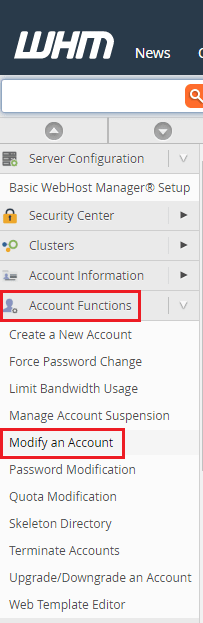
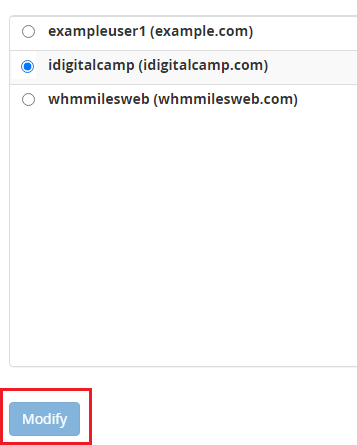
- Select the account and click Modify.
- Find Maximum Hourly Email by Domain Relayed in the resource limits.
- Type a number for this account only.
- Click Save.
Steps to set it in a package
- Search for Edit a Package.
- Pick the package.
- Fill in Maximum Hourly Email by Domain Relayed.

- Click Save Changes.
Tip: Think about what the site really sends. A small blog needs few emails. A shop or newsletter needs more. Pick a number a little above normal use.
What happens at the limit?
Extra emails get a "domain has exceeded the max emails per hour" error. They are rejected or held. Users see the error in a bounce message. A bounce is an email that comes back because it could not be delivered. The limit resets in the next hour.
If you are not sure what number to pick, ask Hostvento support.
Quick recap
- The setting limits emails per domain per hour.
- Set it in Tweak Settings, then the Mail tab.
- You can also set it per account or package.
- Zero means unlimited, which is not safe.
- Choose a number just above normal use.