

What chkdsk does
chkdsk stands for "Check Disk". It checks the file system of a drive and can repair errors. Typical file system errors are:
- Files that are damaged and cannot be opened.
- Files that are lost or in the wrong place.
- A slow system caused by file system problems.
- Blue screen errors.
When to run it
- After a crash or a power cut.
- When the PC is slow or files look damaged.
- Before a big change, such as a new OS or new hardware.
- As part of regular upkeep.
Open Command Prompt or PowerShell as Administrator.
Basic use
chkdsk C: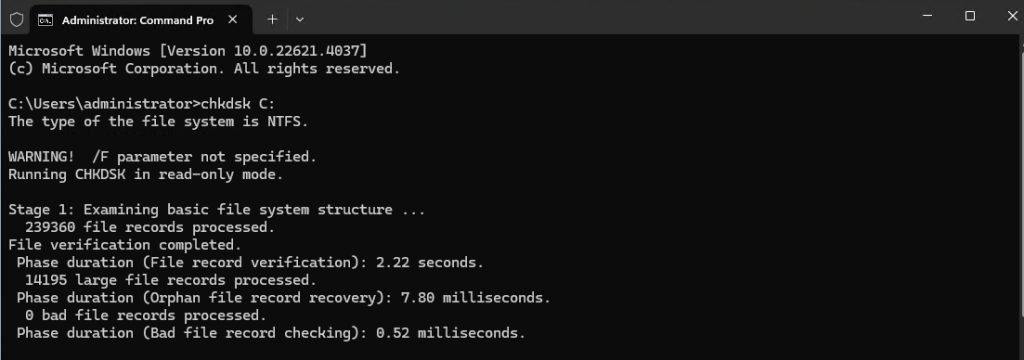
This scans drive C and prints a report. It does not change anything.
Common options
| Option | What it does |
|---|---|
/f | Fixes errors it finds |
/r | Finds bad sectors and recovers readable data (includes /f) |
/x | Dismounts the volume first if it is in use |
/v | Lists every file as it scans |
/l | Sets the size of the log file |
/b | Re-checks bad clusters (NTFS only) |
Examples
Check and repair drive C
chkdsk C: /f /r
If the drive is in use, Windows asks to run the check on the next restart. Type Y and restart.
Fix a removable drive
chkdsk E: /fDismount a drive in use and fix it
chkdsk D: /x /fShow a detailed report
chkdsk F: /vTips
- You can set Windows to run chkdsk at start-up with
chkntfs /c C:. - A scan of a big drive can take hours. Plan for it.
- A repair can lose data if it finds serious damage. Back up important files first.
Quick recap
chkdsk C:only reads.chkdsk C: /f /rrepairs.- Run it as Administrator and back up first.