

What are these things?
Command Prompt is a black window where you type commands to tell Windows what to do. Task Manager is a tool that shows which programs are running. Admin rights (administrator rights) mean the program may change important settings. Some commands only work with these rights.
Steps
- Press Ctrl + Shift + Esc at the same time. Task Manager opens.
- If you see a small window, click More details at the bottom.
- Click File in the top menu.
- Click Run new task.
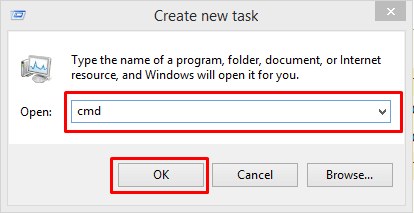
- In the box, type
cmd. - Tick the box named Create this task with administrative privileges.
- Click OK.
A Command Prompt window opens. Look at the title bar. It should say Administrator: Command Prompt.
A faster trick
- Open Task Manager.
- Hold down the Ctrl key.
- Click File, then Run new task, while still holding Ctrl.
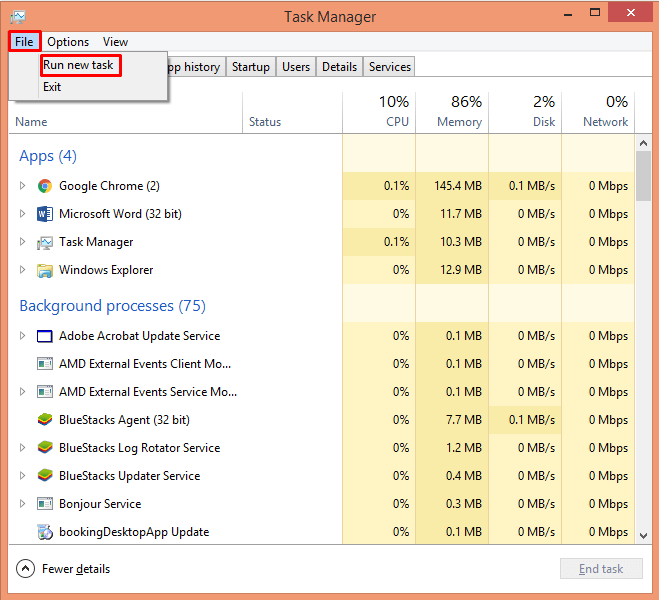
This opens a Command Prompt with admin rights at once. It works in many Windows versions.
Check that it worked
Type this command and press Enter:
whoami /groupsThis command lists the groups your account belongs to. If you have admin rights, you will see a line with "High Mandatory Level".
Tip: Your own Windows account must be an administrator. If it is not, Windows will ask for an admin password. Without it, you cannot go on.
Warning: Be careful with admin commands. A wrong command can delete files or break Windows. Only type commands you understand, and take a backup first.
Other ways to get the same window
- Click Start, type cmd, right-click Command Prompt, and choose Run as administrator.
- Press Windows + X and pick the admin option for Terminal or Command Prompt, if it is in your menu.
Quick recap
- Press Ctrl + Shift + Esc to open Task Manager.
- Go to File, then Run new task.
- Type
cmdand tick the admin box. - Click OK and check for "Administrator" in the title.